Category Archives: Electronic music: production

All facets of composing and creating music with computers and electronics, including historical and technical aspects that seem interesting to me

AI songs generated via Udio

Originally posted 2025-02-26, updated 2025-05-26

Mystery “Celtic” New Age from udio

I got the original version of this out of udio.com last Octber from a simple prompt like “new age/celtic/harp/female vocal/lush arrangement”

I thought it had a good sound and interesting vocal line but the weird thing was that the vocal was in an unknown language. I never had udio do this before even after a few hundred different song generations of all types. But the weirdest thing was that I specified “instrumental”…

Mystery Faux-Celtic New Agey piece

Nothing special about the arrangement; just a short intro and outro with uillean pipe and three verses (that may be identical).


“Come back home to me” from udio

Experimenting with its lyric writing option
“Come back home to me”

Version 1
Version 2

In reading the Reddit group for users of Udio, one contributor pointed out he got exceptionally good results with a very detailed Prompt he had rewritten via ChatGPT. The Prompt was:

“A deeply emotional soft rock ballad with elements of country and folk, set in the early 1970s. The instrumentation includes warm acoustic guitars, gentle electric guitar leads with a touch of reverb, and a steady yet delicate drumbeat. The song is sung by a female vocalist with a rich, expressive, and slightly husky voice—think Linda Ronstadt, Stevie Nicks, or Emmylou Harris. Her delivery is raw and heartfelt, filled with longing and desperation, capturing the heartbreak of a young woman waiting for her lover to return from the Vietnam War. The arrangement builds from an intimate, acoustic intro into a powerful, soaring chorus with harmonies, evoking artists like Fleetwood Mac and Crosby, Stills, Nash & Young. The mood is wistful, dramatic, and deeply moving, with lush instrumentation that swells in the choruses before fading into a quiet, haunting outro.”

I thought this was intriguing. Even though this wasn’t a style of song I was that interested in, I put the prompt just as he wrote it into udio and generated a 2:11 song, with lyric generation turned on as well. udio creates two songs based on your “prompt”, both of which I include above (“Version 1” and “Version 2”) I didn’t do any tweaks, but just downloaded them and created some basic players for them.

If you compare the songs that udio generated, you can see that it wasn’t able to incorporate all the concepts in the Prompt: it’s more of an intimate folky style and doesn’t have a “powerful soaring chorus” or “swelling lush instrumentation”. I think Version 2 also uses piano in the arrangement that doesn’t show up in the Prompt.

The intelligibility of udio singers is sometimes not so good, and I got the feeling it was generating somewhat too many words, and some other minor issues.. But this is the kind of thing you tweak in the refinement phase.

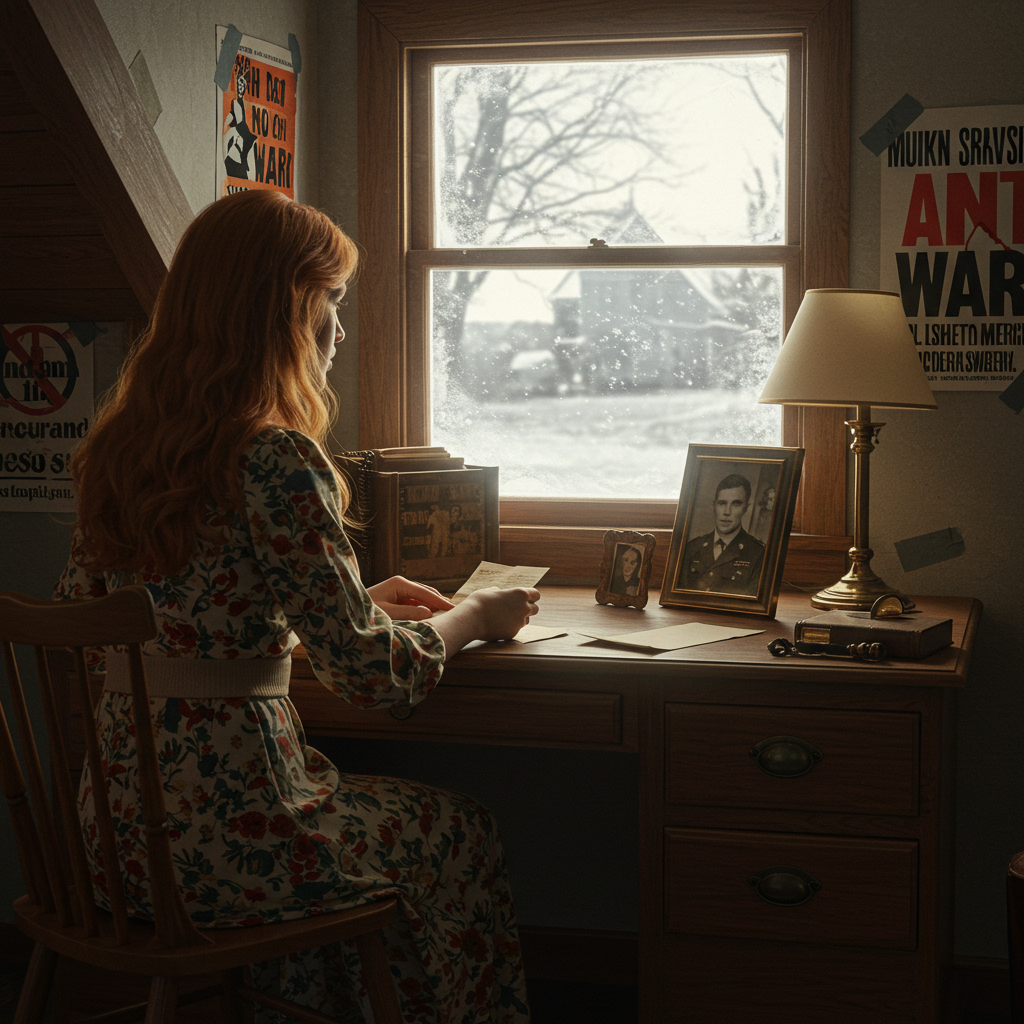
To generate the illustration, I used Imagen with this prompt:

“photorealistic illustration described as follows: a young woman aged 18 – 20 sits at a desk facing away from the viewer. It’s a small room, probably on the second floor. Her hairstyle and clothing indicates the date and location is late 1960s or early 1970s America. In front of her is a window showing a winter landscape. She’s reading a letter. On the desk is a small framed photo of a smiling young man in a US Army uniform. There are a couple posters on the wall of the room protesting the Vietnam war.”

Lyrics for version 1 (also generated by udio — unedited)

These can use plenty of work in my opinion, but that’s the beauty of udio: you can use your own lyrics, modify their auto generated ones, or even create instrumental tracks. (I used the current version 1.5 of udio in January or February of 2025.)

[Verse 1]
The letters lay untouched on the floor
Whispers in these walls speak of war
She's held onto hope through storm and rain
Dreams held aloft, but the pain remains
Silhouettes dance in her midnight skies
Fogging the truth, she waits, she cries

[Chorus]
Oh, come back home to me
The wind carries your name, you see
With every tear shed down the lane
In my heart, you still remain

[Verse 2]
The clock hands move, slow grains of sand
She traces his words with trembling hands
In the mirror, her eyes tell the tale
Love and longing, a veil so frail
Promises echo in the empty room
Silent screams held in the waiting gloom

[Chorus]
Oh, come back home to me
The wind carries your name, you see
With every tear shed down the lane
In my heart, you still remain

[Bridge]
The moonlight whispers secrets untold
In her heart, she's forever bold
Hope unwavering through the night’s song
Knowing her love will keep her strong

[Chorus]
Oh, come back home to me
The wind carries your name, you see
With every tear shed down the lane
In my heart, you still remain

The piece has possibilities: the first thing I’d do is pare down the lyrics, but the ideas the AI came up with are good and in any case different than I would have ever come up with. I have the udio first paid tier, which isn’t very expensive ($10 month at present).

I strongly recommend musicians check this out with an open mind. I’ve been around long enough to have lived through all the things that were going to kill music: synthesizers/drum machines, recordable cassettes, the ability to make unlimited digital copies of LPs, then CDs, MIDI, RIAA wars on MP3 sites, computer applications like Fruity Loops, Reason, Ableton Live. Then the genre wars ( jazz?! that’s not Music! rock?? that’s not Music! Rap?? That’s not Music!)

Somehow, creativity always wins.

Is AI what’s finally going to wipe out creativity in music? From a brief review of history, I don’t think so. But it’s going to be a hell of a ride.

(Last updated 2025-05-26)

Help — mystery sample!

2018-02-01

OK, I need the collective knowledge of the internet to help me out with this one!

Mystery Sample from “Haborthelem”(4:16) from “Songs in Work”

(click (>) to play)

Years ago in the Csound Book sample CDs there was a folder called “GomiPeace – KazuhikoGomi – SpeechProcessing” that had this file “pareq2.wav” — which I presume was intended to demonstrated parametric eq and a number of other signal processing techniques. But I found it intriguing and ended up building a piece off it

The basic sample just sounds like a woman saying a word that I would transcribe as “haborthelem”. She seems to enunciate it very clearly but I have no idea what language it is or what it might mean. What we need is a google – type search but of an audio file. Yahoo had something like this but they closed it down in 2008. Google doesn’t have it and Shazam, while a really cool way to find out what song is playing, doesn’t do it either.

Roughly related to this, I had a friend share with me a piece of audio that he got years ago from a friend on an old cassette, and never could figure out what it was. It was an approximately three minute piece of a young boy reciting a metaphysical essay with a very simple piano piece playing behind it. By using some keywords from the recitation, I found out it was a Ray Lynch production — I believe the title is “A great and wonderful mystery”.

When you are confronted with an unknown text or song as in this case, if your searching comes up empty, wait a couple years because every year the web adds terabytes of data. This is particularly true if your interest is in genealogy; I have found links in even casual searches that came up blank just a few years ago.

Follow up 2019-11-05 – well, a year and a half has gone by and I am no closer to solving the problem. I need to find a “speech-to-text” project or a “audio search engine” on the web and submit to file to those…

Zoom R8 recorder — my favorite gadget

…(awesome) lap-sized 8 track recorder…!

[ 2025 update ] Believe it or not I am still using this box as my primary audio interface to my Windows 10 audio production system. It turned out that some of the buttons were actually wearing out. An electronics wizard friend of mine found the same buttons for sale on ebay and actually did the rework to fix it.

But I depend so much on the unit that I searched for either new old stock, or a nice used unit to keep as a backup. I found one from a Japanese seller, which I bought. It turns out to be in beautiful condition, and has a serial number in the 60,000s, e,g, about 30,000 higher than my previous one; e.g. quite a bit newer.

So that will be my third one. I broke the first one because I took it with me on many business trips, and finally dropped it one too many times.

Incidentally, I looked very carefully at the Zoom R12. announced in 2022, which is supposedly meant to replace to R8. After researching its features and reviews on the Web, I determined that I couldn’t use it.

Notes on 1.17 firmware upgrade – problem and solution

[ 2025-03-01 ] After I don’t know how many years, Zoom has put up a new version of the R8 firmware on their support websites. The original version was 1.00, and a 1.02 patch was released long ago. (1.02 fixed an occasional problem where the mode where the R8 memory was a USB device didn’t always work right.)

When I first upgraded one of my units to 1.17, I found that the audio interface function was totally broken on my Windows 10 machine. In all applications, attempting to use the R8 audio interface would fail as follows: when playing audio, for some seconds it would play correctly, then the audio quality would degrade to an unusable degree. Nothing I tried could fix that, and unfortunately I could find nowhere on the internet where there was 1.00 or 1.02 firmware to downgrade to.

I finally got in contact with Zoom support in Japan. The helpful advice they gave me was to make sure the Windows Zoom audio driver was also upgraded to the version that was included with the new firmware (this is 2.6.0.11 I think).

This solved my problem and I can now use the R8 with any applications – Ableton Live, Reaper, Sound Forge, Izotope Ozone, VLC player, you name it. Incidentally, I still use ASIO4ALL for my ASIO wrapper (as I have been for what must be 10 years.


[ 2019 notes ] I’m updating this to add a few more comments. I’ve owned this since at least 2013 and maybe before. I see from a quick web search that this is still available which should immediately tell you something in this day of advancing technology.

See the outstanding review with photos by Rich Menga; a good takeaway is that he makes this comment, which I fully agree with:

I’m very surprised anyone who records at home doesn’t own an R8.

For various reasons I wanted something very small and portable I could use as a songwriting/scratch pad. I looked at several from Boss and Tascam but settled on this unit. It can actually be battery powered with AA batteries (!); and even supports rechargeable AAs (!!) (see more on this below).

The recording medium is an SDHC card. It ships with a 2 GB card containing a lot of excellent drum loops, but you can install up to a 32 GB card, which I highly recommend, particularly as they are sub-$10 at this point. I copied the loops to the larger card and there is tons on room now for projects and takes. If somehow you fill up a card just put in a new one…but I’d be surprised if you did.

Two tiny condenser mics are built right into the device. They’re obviously not ultra high quality but fine for recording acoustic instruments/vocals.

The audio effects and processing options are very good. In particular, the guitar effects are great for me. With an electric or acoustic guitar, or a piano and your voice you can create really good tracks. There’s plenty of processing options for vox, bass, special effects, eq.

I cannot recommend this more highly! One of the things I’m finding out is that I’m more likely to record a passing idea when I can boot this up in 15 seconds, plug in my guitar or sing (or even take a voice note!) into it. You don’t even need to set up mics, but can play an acoustic instrument or sing right into the built in mics! Later on when the whole studio is booted I can easily transfer the audio files to Reaper or Live.

The included loops and rhythm patterns are surprisingly good. Not only that, but if you have a collection of your favorite loops, you can use your computer to copy them to the R8 and use them just as you can with the supplied ones! Of course they have to be 44.1k WAVs, but plenty of those fit on the 32 GB SD card.

Real guitar players have dissed the R8’s built in guitar effects, but for my money I never use my Pod or Korg Pandora. I never play live so for my needs the built-in effects are outstanding. Not to mention the bass, clean channel, mic channel and mastering effects. (Full disclosure: once I got Native Instruments Guitar Rig 5 I use that for everything; I can even track guitar parts with it and my computer is not that recent or fast.)

Long digression about the R8 audio interface capabilities

Due to the demise of my Windows 7 computer, around 2019, I was forced to buy a completely new one. I wanted to keep running Win 7, but new computers no longer support old PCI cards, thus my beloved m-Audio Audiophile 2496 was no longer usable. I was sort of forced into Windows 10.

The built-in audio in the supposed great motherboard was shockingly bad: at high volumes. There was an audible continual background noise, and when certain CPU operations occur or you use a mouse, you can hear a zipping or tearing noise in the audio.

So I thought, no problem, I’ll just buy a simple PCIe audio card. That’s when I found out that basically there were no cheap PCIe audio cards. My salesman at Sweetwater, bless his soul, pointed out “hey, you have your Zoom R8 right? you can use it as a USB audio interface.” Well, slap my fro…I’ve had the thing all these years and never thought of that..

It turned out that it worked excellently and seems to sound quite good…so: problem solved, with equipment I already had! And I can still play the guitar into it, into my DAW and guitar plug ins, and monitor at the same time.

OK: returning to the original content in this review:

  • The display is bright enough to actually see!

Yes, some of its functions can cumbersome to access (e.g. trim audio files) but for its size you just can’t beat it. Really, even though Zoom has released some newer and larger versions of these recorders, for my needs none of them are really as good as this one. I was looking at the R16 but I really have no need for 8 track simultaneous recording. The R16 uses 6 batteries too, and doesn’t have the rhythm unit that the R8 and R16 does.

Maybe it’s just my own personal taste, but I demoted my Line6 PodXT off my desktop (and onto ebay, sayonara) and only use the Zoom to record guitar tracks into my computer. Sometimes I’ll use NI Guitar Rig to punch up the processing. The nice thing is that you can record your guitar lead dry while monitoring effects, and bounce the effected part to another track. Then you can import the clean and FX track into your DAW, and add further effects.

  • Battery powered!

Using 4 AA alkaline batteries you can get up to 5 hours of use, per the manual. But I am using 2500 mAh NiMH, which give at least 2 hours and more likely 3 or more depending on what you’re doing. (I’m going to actually measure this and will update the page when I do.)

Quick Pros and Cons list: based on my usage, YMMV of course!

The Amazon “From the manufacturer” section is informative and accurate. Not going to link to them for free though! Like they need any more money to add to their $trillions.

Pros:

  • Small and extremely light (257 mm × 190 mm × 51 mm, 780 gm) – not sure if that’s with the batteries or not
  • Boots up in a few seconds
  • Bright backlight
  • Built in stereo mics (tiny electret condensers at the front left and right corners of the unit)
  • 2x XLR inputs in the back
  • 24V/48V phantom power (you should probably be using USB power in this case)
  • USB 2.0; files transfer to computer pretty quickly
  • Usable FX
  • Simple sample feature
  • Simple drum machine feature with hundreds of usable patterns included
  • Up to 32 GB SDHC cards supported
  • Some of the supplied audio loops are pretty cool (I mean, how impossible is it to make everything thrilled with all the musical styles that are out there)
  • Quick control surface capability
    • I love this, I can quickly assign a couple faders to some of my Ableton controls if I decide I need to do some tweaking
  • Good audio interface (see above)

Cons: a lot of these are pretty trivial, but just to let you know:

  • This is not a cheap item. Pretty much everywhere will charge you USD299 for it. Still cheaper than any of the interface cards I looked at.)
  • Some functions like bouncing and file trim/split are a little arcane, but with some dedicated reading of the manual supplemented with YouTube lessons you can easily learn it
  • You can only record two audio channels at a time
  • Be careful; if you are wedded to 48kHz you can’t record with FX at that SR
  • It will lose the date and time if the batteries fail and you don’t replace them or hook to USB power within a few minutes. (It’s not a big deal to reset the date/time). If you don’t reset the time then new files will have wrong timestamps; I don’t know if there are any other gotchas.
  • Renaming files is cumbersome using the jog wheel/cursor
  • Supplied SD card is only 2GB; about half of it is supplied loops and drum patterns.
  • Setting loop timing on fx comes up in ms; but Rich Menga in his review above shows how to get to the musical tempo setting

I was worried what I was going to do if Zoom discontinued this (which they did) and mine finally died (which it was in the process of doing). It turned out that the internet saved the day, once again.

Last modified 21 Mar 2025

What the hell am I doing? Nothing??

update 2024-11-11

I’ve gotten excited about a cover to Alcest’s “Sapphire”. Really an atmospheric piece. I spent more time than I like to admit trying to figure out the lyrics. I understand the band is French but the words didn’t sound French to me. If I have read correctly, the singer just improvised phonetic sounds over the arrangement that felt right to him. That I think is awesome. And it works.

So being a different person, I get a different feeling from the music, so I am writing lyrics in English that fit the melody. Trying to learn the guitar part — harder than it looks. Also the piece is in G# minor which caused me grief until the light bulb went off: transpose it up a step in Ableton and voila, it’s now in A minor which is cake.

update 2012/05/11

Well, as the grave draws ever nearer I am stuck in an obsessive-compulsive loop working on a couple of new pieces. Besides Life As Usual, the main thing delaying progress on these works is my attempts to play parts that are way beyond my musical abilities. But the good thing is that I believe I have SOME perspective on my own work. My best technique is to put aside a piece for one or preferably two weeks. When I return to them, I strip out whole chunks of them or even abandon them.

update 2012/02/18
I did buy a beautiful 25 inch LCD monitor from Fry’s Electronics in San Diego. Of course, within a week or two there were 27 inch models for less money. But I guess I can’t chase technology around forever.

I really like this monitor. Now I can see more stuff in my DAWs with less eyestrain.

update 2011/10/22
The good news is that I have a full time job = income again. The bad news for finishing songs is that it’s a full time job. I am not looking the gift horse in the mouth. For one thing I finally was able to afford upsizing my monitor again. As I get older I need larger and larger screens!

I’m in too-many-choice-hell again with Ableton Live. I have been working on a piece for about a year, it has 50 killer riffs and leads in it, and I just can’t seem to prevent myself from adding new or better ones. At least I’ve got it mostly arranged. But I think the years of 1 album per year are not to happen now unless I win the lottery or retire…

update 2011/10/22
Since finishing Pangur Ban I revisited some older tunes. And I’m wrapped around the axle on those as well, partly because I am obsessed with not throwing anything out. I got the bright idea of not working on anything for a week or so, hopefully when I get back to work I will hear pieces with new ears.

The other thing that I do that’s a huge time waster is spending a hour on a snare drum sound, or half a day of a 2 bar rhythm groove. I think it’s pretty obvious at this juncture I would not really be capable of writing anything to deadline…

update 2011/09/12
No one ever accused me of updating this blog too often. Since March 2011 I have actually had a full time job. Really more than that as I am averaging 10 hour days. Not so easy for someone of my advanced years. But it’s nice being able to pay my bills without draining my meager savings. At last I have finished my piece called “Pangur Ban”. For more info and a link to a player for it, see this page. And here’s the background on what Pangur Ban is from Wikipedia..

I’m content enough with it. I gave it its own page since I think it has some interesting production aspects. Briefly, it started with a sample from the OLPC that I thought was interesting. When I slowed it down like 75% it revealed an interesting melody — sort of reminiscent of something you’d hear out of the Buddha Machine. So I arranged, orchestrated, looped and generally mangled it into the new piece. I’ll try to get it loaded on SoundCloud soon with a link to it here. update 2010 11 30Yeah, even though I have time I have urped out nothing new in too long a time. Well, I’m trying to finish this piece:

46-channel Ableton Live set

Well, that and buying some new toys for my studio… update 25 Dec 2010 OK, I finally finished “Haborthelem” (what does that mean? I have no idea but I probably should.)

update 11 jan 2011 The good news is I have more time to work on music. The bad news is that I don’t have any more income for the time being…

update 17 feb 2011 Yesterday I attended a lecture on Pd. This is the Open Source software reminiscent on Opcode’s venerable Max audio programming system. It’s sure come a long way since I last looked at it five years ago or so. At that time it was only partly ready for prime time, but the current version appears much more stable and functional. I’m going to update my comments about it on the “Free or cheap music software” page.

Scary developments

update 2012/02/19

Well, that turned out to be a false alarm. I’m back to my version of black metal compositions for the time being.

I still reserve the right to do vocals some time in the future. Maybe I can be the Gordon Lightfoot/Leonard Cohen of my generation (*snerk*)

original post: 2011/07/27

OK, confession time.

Probably giving my age away pretty badly; in my rotation of CDs to listen to during my commute, I pulled up my old Talk Talk collection.

The embarrassing admission is that I actually sing along to them in the car. So what the hell? I thought. I hooked up a mic on an improvised stand (adapted from an old camera tripod I had), hooked it to my ART preamp, and sang along with a bunch of songs on “The Party’s Over” and “It’s My Life.”

So far, I am persisting in my folly but I’m sure reason will return before I make too big a dope out of myself. My plan at the moment is to take one or two tunes and cover them. Basically, I’ll gradually build the track back up using my own tools around my own lead vocal.

This is a lot of fun, even if the tracks never see the light of day. For instance, one track I want to slow down just a few percent which is not much easier with the better elastic audio tools available in most decent DAWs.

Meanwhile I’m also working on a couple other tracks I started as long ago as 10 years which I hope to finish before I get too old to know what I’m doing. Hopefully there will be more frequent progress reports than I’ve been making.

(posted 2011/07/27; updated 2012/02/19)

“The Producers Conference” notes: San Diego 14 May 2011

This was a great little one day session put on by Propellerheads, makers of the Reason software package. The web page that described it is gone now, unfortunately, but you might be able to see its ghost via the Wayback Machine.

This was well worth the nominal $35 admission fee. It’s difficult to get good technical and business information about the music industry so these rare events are very welcome.

This seminar struck a great balance between technology and industry. The first two presenters, Matt Piper of Line6 (Reason’s US distributor) and Kurt “PEFF” Kurasaki (Reason expert from its earliest days) concentrated on technique, focusing on the Neptune pitch correction tool and advanced compression methods in Reason 5/Record 1.5. Even for producers not using Reason this was valuable info.

Ted Breuner then spoke about his journey into the innards of the music industry from his days as an amateur songwriter in his hometown band to working with L.A. A-list artists. At first I thought he minimized the business aspects in favor of “touchy-feely” concepts, but what he was trying to get across was that, if you enter the business to get rich it will be a miracle if you do, but with passion, commitment and persistence you will be rewarded. You could argue this point but I wouldn’t with someone as experienced as him.

Finally, dance music production wizard Jake Stanczak of Kill The Noise showed some secrets of producing monster tracks using Reason. But with his intensity and commitment, he could probably make fantastic tracks using a handheld cassette recorder and the contents of the average kitchen. Props to him for sharing so generously of his experience as well as his techniques.

I hope there are more of these sorts of events in the San Diego area.

It’s ironic how pop music production seems to have returned back to L.A. again just as it was decades ago…

Last modified (repointed web link to archive.org) 2024-11-11

Life is like that…

I had really wanted to release another “on-line album” by the end of 2010, but it doesn’t look like I’m going to make it. I hate to disappoint all the tim p scott fans of the world, but there’s no help for it.
Meanwhile, this gives me a chance to consider the whole concept of an “album” in the 21st Century. It’s been pointed out that the model of mainstream pop music consumption has returned to the “pre-album” days of the 1950s and 1960s, when the unit of music purchase was the 45 RPM record with the “hit” on one side and the “B-side” on the other. Today, people still have their pop music favorites, but they are more interested in the individual song or track than in an album. Part of the problem was (once again) the “industry” where record companies (and even artists, I’m sorry to say) released their hit song on an album where the rest of the tracks were little more than filler. Or released what looked like and album with 5 or 6 remixes of the same one song. In combination with the artificially high price of records (and CDs), consumers got fed up with this and embraced the a la carte world that the internet age brought.
I hope I don’t get kicked out of ASCAP for talking this way, but it was the RIAA and its constituent company members that were primarily responsible for that boondoggle.
Meanwhile, I have a bunch of individual tracks I’ve produced since 2008, and those are mostly available easily for listening. Go to http://wp.me/PnrSR-nY to check them out.
Meanwhile I’m going to have some good new stuff out I promise, but my other work committments are weird and require travel and other strange scheduling stuff…

Crow Caw gets BFD 2!

Update 2019

This is way out of date. I upgraded to BFD3 a couple of years ago and still love the product. Very well designed software; it adheres to one of my basic software interface design rules: it should be easy to do easy things, and not to difficult to do complicated things. On top of that, I think it sounds great, there are literally thousands of grooves and fills to choose from, the filter function that allows you to choose drum pieces and drum patterns is logical and thorough, the tools for assigning grooves and drum hits to notes is great.

I haven’t really explored other drum software to this level, and for all I know they all do as much as BFD… but for my workflow and style I haven’t found anything I wished it did better.

I have an electronic kit and can play some drums, but why not let the experts do what they do best?

(Here’s the original discussion of our adoption of the BFD drum plug in)

We have used various versions of fxpansion’s BFD drum plugin product for a couple of years. Having played drums in a previous life, nothing I programmed ever quite did it for me. BFD is one of those plugins that basically is a sample playback engine with 10s of gigabytes of drum hit and drum loop and groove recordings.

The first time we tried this it was a free demo version that came in the software disc included with a copy of Computer Music magazine from a few years ago. It was a special version of BFD 1.5 but still had an amazing amount of functionality and a ton of grooves. I always wanted to buy the full version, both to support fxpansion and of course to get more!. So finally in July of 2010 I burned a candle to the gods of debt and ordered it.

[Note to software developers; yes people do steal software, but for me being able to try a well-working demo has led to a lot of purchases of good products like this one.]

It took a while to install. Depending on how impatient you are, the available space on your hard drive, or just how many velocity layers you want, the installer gives you three installation options: small, medium and large. Having just plumped for a 500GB drive I went ahead and installed the large version which takes up about 55GB.

One of the interesting features in BFD 2.1 is “load on demand”. This allows you to quickly create a part with only a few basic layers and articulations loaded, and then when you are editing the track or rendering it, the entire kit is loaded.

Overall, the sound quality and programmability of the software is superb. You can program many articulations of the more complex parts of a drum kit such as snare rim shots and various strikes on a hi hat. The internal mixer lets you select microphone locations and contributions from room, overhead, and close mics, along with plenty of signal processing and routing options.

The only complaint I have at the moment is that the GUI is awful hard to see and read due to the tiny font and dark color choices. Unfortunately, it doesn’t look like the GUI can be customized, and a post on the FXpansion support forum indicates the company is not excited about creating that possibiity. But with the use of the Magnifier accessory and a little experience, so far I’m a happy camper.

Somewhere along the line in 2010 they released 2.2 (I think 2.2.0.48 is the full number; in late 2011 they appear to be beta-ing a 2.3 version) It’s been stable enough for me that I haven’t seen much of a difference but it gives me a warm feeling. After spending actual money for it I might as well upgrade…

last modified 2011 dec

Some notes on software guitar processors

updated 2019-07-29

This is one of those posts that was halfway in the middle of being modified when I got interrupted and abandoned it. So let’s see if there’s anything salvageable in it:

sometime in 2015

Well, this is already 5 or 6 years old and there has been much progress in this field….the last version of the below was dated dec 2010.

Introduction

I’m not much of a guitar player, and the guitar I have is of equal quality. So, can using VST guitar plugins make the proverbial silk purse out of a sow’s ear? Yes and no.

Here are some notes about a few demo and freeware versions I’ve used. Your mileage will certainly vary, but at the least it may be something for you to consider.

Also remember that many of these are continually being worked on and improved, so the versions I’m writing about are probably already obsolete as you read this.

Native Instruments Guitar Rig

My collaborator pointed me at this; the best part being that the demo version (5) sounds great even though it is very limited in the number of components you can select. Somewhere along the line I found an offer for this for $99. It’s still (in 2019) my best software guitar processor.

Amplitube (version 3 or 4?)

This may have changed but this was a real ripoff because for your $200 you got one or two amp models, one cabinet, and a handful of distortion and other processors. The NI product have nearly a complete library of models and processors.

To be fair, the few modules I was able to experiment with in Amplitube did sound great.

Line 6 (www.line6.com)

I liked the POD but ultimately I couldn’t get the sounds out of it I wanted. Maybe my problem. In any case they now have a software only version, the demo is worth checking out.

Studio Devil BVC (www.studiodevil.com)

+ VST

+ Free version  for eval! (BVC variant)

+ Cheap

Pretty nasty distortion tool which can border on shrill. A little of this goes a long way.

ReValver (www.alienconnections.com)

Free versions of this commercial product can be found that have a subset of its entire feature set. This is the ultimate tweaker tool. You have a tool box full of preamp and amp models and processors you can wire together into a virtual rack, sort of like the Reason model. In each device you can actually get in and edit it as though you were actually modifying the device’s electronics. Very powerful and capable of great sounds.

Not using it so much now in 2015 since the NI Guitar Rig 5 does everything it does.

♥ Dirthead 0.80

My favorite single processor. May require a little EQ to tame the “honkiness” you can get from a cheap guitar.

  • FREE!
  • Three levels of distortion
  • “Cabinet” switch is useful and adds good sound
  • Simple to use, stable, extremely light CPU footprint
  • Did I mention FREE?!

Voxengo Tube Amp

Voxengo BoogeX

After tinkering with these a lot, it became clear that they often had one or two great characteristics, but alone didn’t do the trick. This is where Ableton’s Rack paradigm comes in handy. It’s simple to create a Rack which is a layer of several of these tools. I have Racks that parallel three or four of them, usually Dirthead, Studio Devil and Boogex. Another channel with a Live Utility device allows you to add some clean signal.

Then you can map Macro controls to easily tweak the amount of contribution to the entire sound from each device.

Then I got a job…

Hallelujah and amen. Once I managed to get an income again (not through music…that’s not ever been anything in my life)–after some research I splurged on my guitar. First I paid an expert (Moze Guitars) to set up and intonate (is that a real word?) it. I replaced the pickups with EMG active pickups at great expense…the idea was it would be much more hum resistant. Not so sure about all that.

In any case, it’s a hell of a lot more fun to play now.

I decided my trusty DigiTech RP100 was due for retirement, so after some research I ended up with the Korg Pandora PX5D. That was OK for a while. It was cool how small it was – like pocket sized. Finally I replaced it with a Line 6 Pod XT.

As of 2019 that’s gone too. I have Ableton Live and NI Guitar Rig set up for short enough latency I can actually play guitar parts in real time. But if there’s ever any problem, I bounce the arrangement without guitar to a WAV file, move that to the Zoom R8 and play through that unit’s guitar modelers. That way I don’t even need to turn on the computer to work out guitar parts.

The short story is that it’s a great little unit but since this page is supposed about software I’ll write about these things elsewhere.

Last updated 3 Dec 2010

Snapshots from around the studio

Crow Caw Music Works International Headquarters

Gimme that comfy country vibe!

Guitar department - 2010

Guitar department - 2010

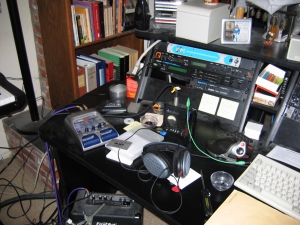
There’s a wealth of interesting detail here (depending on your personal understanding of the word “interesting”…) Notice the high quality $20 First Act guitar amplifier you can just see the top of under the desk. I’ve since relocated it a little bit and covered it and its mic with a heavy blanket. This seems to give me better guitar sounds…possibly because I can run it louder.

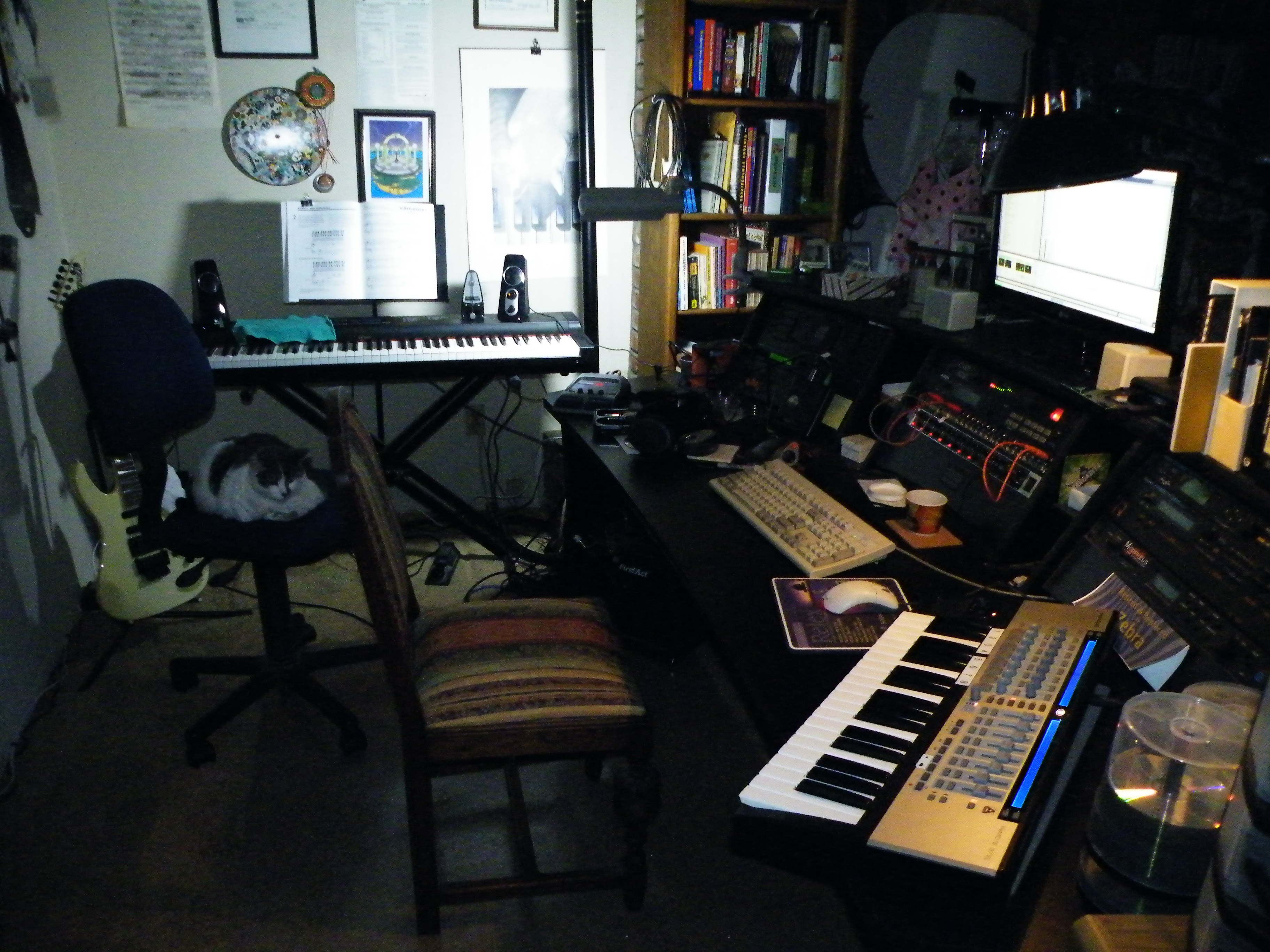
The photo below is from last fall, when I was still working on my piano lessons and the Novation Remote SL was still on the right hand side of the production desk. It’s sort of dark but you can make out one of the official CCMW Studio Cats on the task chair. When that happens I have to drag a wooden chair in to work on.

Last fall with Lucy