[ 2026-02-11] I signed up for udio last year and had a lot of intriguing fun with it. It wasn’t perfect, by a long shot, but I definitely got it to do some remarkable and outre things.
Well, as the world goes, it went. It was apparently purchased by some huge corporate blob that I’d never heard of. Once I read their “vision” for the site and saw what they were doing to customers, I decided it wasn’t worth the effort and uncertainty to continue my subscription to it.
I have a lifetime of unfinished music and ideas for new pieces, I’ll work on those for the time being. Some other service may come along that looks interesting, and maybe I’ll experiment with it.
This is not new to me after decades around computers. I still use Adobe Acrobat 9.0 Pro because I don’t have to subscribe to it and it does everything I’ve ever needed and more. There will probably come a time where it won’t work with some future version of Windows but I’ll just deal with that when it happens.
By A. Person|Comments Off on udio: it was nice while it lasted
(Note added 2026-02-11) A lot has happened in a year. udio was bought by some corporate behemoth and I cancelled my subscription. See the newer post for some notes on that. What follows is my original Feb 2025 post.
I got the original version of this out of udio.com last October from a simple prompt like “new age/celtic/harp/female vocal/lush arrangement”
I thought it had a good sound and interesting vocal line but the weird thing was that the vocal was in an unknown language. I never had udio do this before even after a few hundred different song generations of all types. But the weirdest thing was that I specified “instrumental”…
Mystery Faux-Celtic New Agey piece
Nothing special about the arrangement; just a short intro and outro with uillean pipe and three verses (that may be identical).
“Come back home to me” from udio
Experimenting with its lyric writing option
“Come back home to me”
Version 1Version 2
In reading the Reddit group for users of Udio, one contributor pointed out he got exceptionally good results with a very detailed Prompt he had rewritten via ChatGPT. The Prompt was:
“A deeply emotional soft rock ballad with elements of country and folk, set in the early 1970s. The instrumentation includes warm acoustic guitars, gentle electric guitar leads with a touch of reverb, and a steady yet delicate drumbeat. The song is sung by a female vocalist with a rich, expressive, and slightly husky voice—think Linda Ronstadt, Stevie Nicks, or Emmylou Harris. Her delivery is raw and heartfelt, filled with longing and desperation, capturing the heartbreak of a young woman waiting for her lover to return from the Vietnam War. The arrangement builds from an intimate, acoustic intro into a powerful, soaring chorus with harmonies, evoking artists like Fleetwood Mac and Crosby, Stills, Nash & Young. The mood is wistful, dramatic, and deeply moving, with lush instrumentation that swells in the choruses before fading into a quiet, haunting outro.”
I thought this was intriguing. Even though this wasn’t a style of song I was that interested in, I put the prompt just as he wrote it into udio and generated a 2:11 song, with lyric generation turned on as well. udio creates two songs based on your “prompt”, both of which I include above (“Version 1” and “Version 2”) I didn’t do any tweaks, but just downloaded them and created some basic players for them.
If you compare the songs that udio generated, you can see that it wasn’t able to incorporate all the concepts in the Prompt: it’s more of an intimate folky style and doesn’t have a “powerful soaring chorus” or “swelling lush instrumentation”. I think Version 2 also uses piano in the arrangement that doesn’t show up in the Prompt.
The intelligibility of udio singers is sometimes not so good, and I got the feeling it was generating somewhat too many words, and some other minor issues.. But this is the kind of thing you tweak in the refinement phase.
To generate the illustration, I used Imagen with this prompt:
“photorealistic illustration described as follows: a young woman aged 18 – 20 sits at a desk facing away from the viewer. It’s a small room, probably on the second floor. Her hairstyle and clothing indicates the date and location is late 1960s or early 1970s America. In front of her is a window showing a winter landscape. She’s reading a letter. On the desk is a small framed photo of a smiling young man in a US Army uniform. There are a couple posters on the wall of the room protesting the Vietnam war.”
Lyrics for version 1 (also generated by udio — unedited)
These can use plenty of work in my opinion, but that’s the beauty of udio: you can use your own lyrics, modify their auto generated ones, or even create instrumental tracks. (I used the current version 1.5 of udio in January or February of 2025.)
[Verse 1]
The letters lay untouched on the floor
Whispers in these walls speak of war
She's held onto hope through storm and rain
Dreams held aloft, but the pain remains
Silhouettes dance in her midnight skies
Fogging the truth, she waits, she cries

[Chorus]
Oh, come back home to me
The wind carries your name, you see
With every tear shed down the lane
In my heart, you still remain

[Verse 2]
The clock hands move, slow grains of sand
She traces his words with trembling hands
In the mirror, her eyes tell the tale
Love and longing, a veil so frail
Promises echo in the empty room
Silent screams held in the waiting gloom

[Chorus]
Oh, come back home to me
The wind carries your name, you see
With every tear shed down the lane
In my heart, you still remain

[Bridge]
The moonlight whispers secrets untold
In her heart, she's forever bold
Hope unwavering through the night’s song
Knowing her love will keep her strong

[Chorus]
Oh, come back home to me
The wind carries your name, you see
With every tear shed down the lane
In my heart, you still remain
The piece has possibilities: the first thing I’d do is pare down the lyrics, but the ideas the AI came up with are good and in any case different than I would have ever come up with. (But “every tear shed down the lane”? Ugh. Even the cliche “every tear shed in the rain” is better than that) I have the udio first paid tier, which isn’t very expensive ($10 month at present).
I strongly recommend musicians check this out with an open mind. I’ve been around long enough to have lived through all the things that were going to kill music: synthesizers/drum machines, recordable cassettes, the ability to make unlimited digital copies of LPs, then CDs, MIDI, RIAA wars on MP3 sites, computer applications like Fruity Loops, Reason, Ableton Live. Then the genre wars ( jazz?! that’s not Music! rock?? that’s not Music! Rap?? That’s not Music!)
Somehow, creativity always wins.
Is AI what’s finally going to wipe out creativity in music? From a brief review of history, I don’t think so. But it’s going to be a hell of a ride.
[ last changed 2025-01-02 ] I needed a way for someone in another room to alert me to when they need assistance or information. But much of the time I’m wearing headphones so I can’t hear them call. The solution appeared to be to use a wireless doorbell inside. But it needed to have a visual-alert-only option.
I first tried the following product. Very simple to set up and inexpensive.; < $30 for two receivers and simple button. 23 AAA in each receiver, 2032 coin battery in sender. Cool color options for the flash.
432 MHz, seems to have plenty of range in my house. Receivers have adjustable volume or mute setting (which I use). 3 AAA in each receiver, 2032 coin battery in transmitter. Bought on Amazon 12/2024 for about $45. “FUHONGRUI” brand
Pretty neat, yes? But unless I’m looking directly at the receivers, I can’t see the visual alert.
So with more research I discovered a high power version where the visual alert is a strobe:
This is much better for me than the colored light models. It’s slightly more expensive (I think I paid about $45 in Dec 2024 for the unit + transmitter button. The room its in is around 400 square feet. If needed, a second receiver can be added. The vendor is Safeguard Supply and let me also add it was a great pleasure to call them directly and talk to a friendly knowledgeable human being. I’m not sure if their products are available on the huge web merchants, but I will always call them directly for anything I need.This is the Safeguard chime/strobe alerter in my pathetic temporary bracket: a clear plastic ice cream container screwed to the drywall. See the link above if you want to see what it looks like without the strobe going off. It’s small, about 3 x 5 x 1 inches and has a standard 2 prong 120 VAC plug on the rear.
By A. Person|Comments Off on Wireless doorbell / alerter project
[ 2024-02-12 Update ] During the COVID year (2020) most piano teachers weren’t taking personal students. But I had just recently retired and wanted to spend more time working on my piano skillz.
Skoove experiences
I knew the basics of piano playing, music theory and reading, and had been trying to teach myself uising books. Although I made a certain amount (small) of progress, it became apparent to me that I needed something more to get ahead with any speed.
When I first looked at skoove, I thought it looked interesting, but I didn’t have a compatible tablet, and my old keyboard didn’t even have USB output — only MIDI. But (again during the COVID layoffs) I had acquired a basic Lenovo Chromebook to do zoom meetings and such, and as mentioned elsewhere, bought a Yamaha CP88 digital piano. Suddenly skoove became something interesting to try, since it ran on a web browser which Chromebook does support.
I started out with the free version which was pretty good. It’s limited on the number of lessons available but gives you a good sense of how the product works. I decided to plump for the licensed version, and didn’t regret it.
There are plenty of reviews out there on web magazines and such. Most of them were pretty positive and rated skoove in the top tier of web-based piano learning software. Of course it’s simple to give it a try. I liked the basic design and the fact that it forced me to sight-read. The song or exercises notation scrolls from right to left and hghlights when you hit the right notes. The built-in piano sound is not bad, but I figured out how to run MIDI into and out of the application so it could trigger my nice Yamaha piano.
I was frustrated that I couldn’t print out the exercises so I could practice when somewhere in front of a real piano, or when I didn’t feel like turning on the Chromebook, logging into the application, etc. I’m sure there were also licensing issues about permitting that. Latency was fine, especially for a beginner/intermediate player like me.
Unfortunately in 2023 skoove announced they weren’t going to support configurations like mine, so I had to regretfully say farewell and look for another application.
Flowkey
I don’t know why I rejected Flowkey in favor of skoove originally. It seems to do all skoove does, but better. It still does support my Chromebook/web setup. One thing it has that’s really good is for many songs you can select a beginning/intermediate/advanced arrangement.
Like skoove, Flowkey scrolls the music from right to left, and you can’t print it. I did mention this on messages through the support part of their app, and I was pleased to see that support people were extremely fast to reply and seemed to care that my questions were answered the best that they could be.
They have lots of songs, but sometimes they’re only brief excerpts. And navigating the song library is a bit frustrating. Skoove had that problem too.
So I did subscribe to Flowkey and at present unless they make some awful changes, I’m planning to stick with it.
One small glitch with flowkey: it doesn’t work perfectly well with my particular version of Chromebook (Lenovo S330). They don’t have lots of Chromebook users and none with my particular model, sadly. But I have to give flowkey support terrific praise for the time they spent trying to help me find a way to get around the particular glitch I experienced.
By A. Person|Comments Off on Skoove and Flowkey piano teaching apps
[ Update 2025-10-17 ] Jamcorder: for many years I would have loved to have this! Basically, it’s a little device you can connect to any keyboard that can generate MIDI output; and it will record your playing any time you sit down and start pressing keys. In my typical day, sometimes I only have 10 or 20 minutes to play my piano, some exercises or songs ideas that may come up. The Jamcorder will faithfully record the performance in its voluminous memory for future uploading to my music production computer.
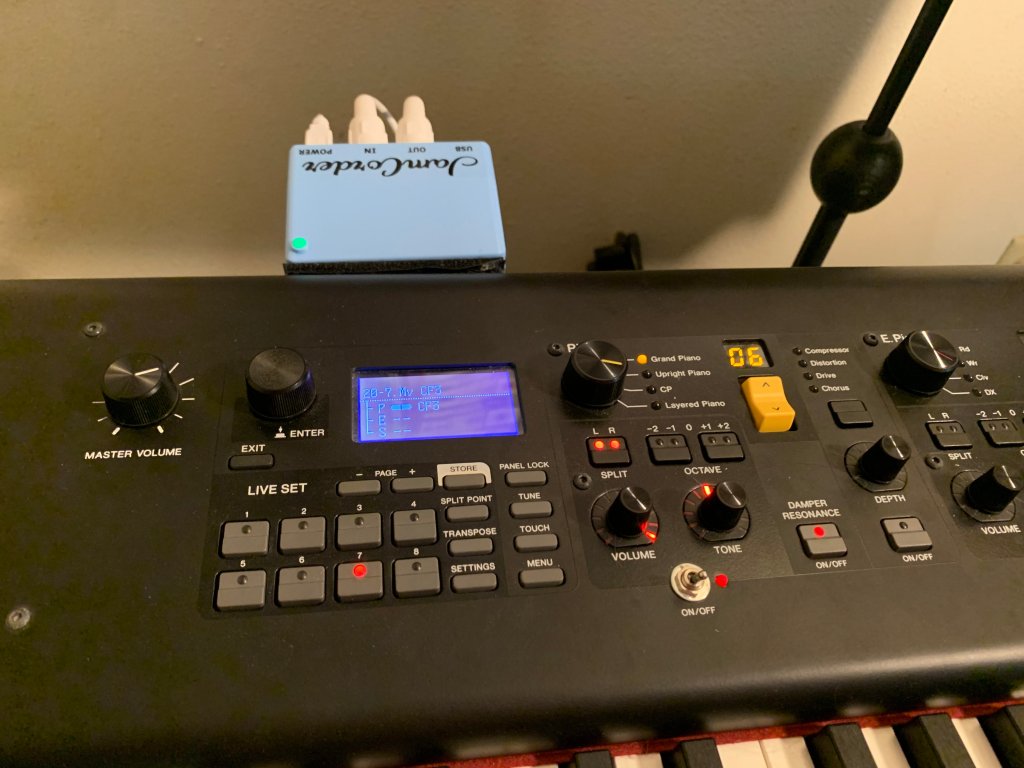
The photos below shows it connected to the MIDI ports of my Yamaha CP-88 piano and stuck on the back of it with velcro strips, ready to record at a moments notice (the led changes from green to red when you start.)
Jamcorder in ready modeJamcorder recording
I don’t know of anything remotely similar to it and most highly recommend it. The old material below discusses a cumbersome hack I did a few years ago to try to emulate the function that the Jamcorder performs so seamlessly.
[ Original content from 2022] Basically I wanted a way to just be able to sit down at my digital piano, turn it on, and with a minimum of extra gear and steps, be able to start playing and capture the MIDI stream. The idea is to move the raw MIDI file to the big DAW for further editing/arranging/etc. Even going to a SSD main drive on my music production PC, it just seemed like overkill when all I want to do is capture MIDI noodling on my Yamaha CP88 electronic piano.
The solution I came up with is not 0-cost, but I already had the $200 barebones Chromebook. All I needed to buy was the $14.99 FL Studio Mobile app (6 stars out of 5!) and a USB extender ($25) since the stupid Chromebook has exactly one USB port (can you believe it?)
Anyway, a training professional will probably vomit at the amateurishness but I can’t spend a million hours making it perfect. I used Nero Video and exactly 0% copyrighted material.
You can check it out on youtube here (it’s about 8:25 long).
Major update 2025-10-17
By A. Person|Comments Off on My MIDI “Listening Box” – now replaced by Jamcorder!
Updated 30 Jan 2022 In 2020, I sold my Yamaha G-1 grand piano — even though it was the smallest Yamaha grand, it just wasn’t practical in my living situation. Fortunately, I live near a metropolitan area with a good selection of music stores, so I tried many, many digital pianos. I did so well with the Casio CDP-100, I set my price limit to about $1500 figuring I could sure get something good for that.
Everything I played had good and bad things about it: the touch, the sound, the features, etc. But nothing got an “A” in all categories. Well, I was about to give up on getting one I liked in that price range when I noticed a Yamaha CP-88 at a Guitar Center. Even though it was priced at $2500 (what I paid for the used G-1!) I was stunned at both the incredible feel of the keyboard action as well as the sublime sound of the units various grand piano. I pretty much almost immediately decided I was going to have to have it.
All I can say is: WOW. When I purchased it, the firmware version was 1.31, and since then there have been some updates. As of 1.40 it includes complete sample sets for the the Yamaha CFX, CF3, S700, and C7. These are pianos which range up into the US$100K – $180K price range. If you can’t find an acceptable grand piano sound among those…I don’t know what to tell you. There are plenty of electronic pianos (Rhodes, Wurlitzer and others) and a very large range of other instruments… But if you’re looking for a detailed Hammond emulation you need to get the YC-88 which also adds drawbars. Since I use it as a piano 99% of the time I am not too annoyed that that model came out so soon after the CPs.
Even now in 2025 I don’t have any desire to replace it.
The list of patches in the instrument included in the update package was hard for me to read, so I reformatted it.
You can get a copy of it as a PDF at the link following. This is current as of firmware version 1.50 which is the latest firmware as of now (30 Jan 2022) The V1.40 list dated 25 April 2021 is also available. I don’t know if these files are relevant to the CP-73,
I think in another post I wrote about the Casio CDP-100 I played before getting this. When I was selling the Yamaha grand, I wanted to have something to play on so I wouldn’t completely lose the little momentum I had teaching myself to play. After trying a number of low-priced electronic pianos at local music stores, I found a CDP-100 at a Guitar Center on the demo floor. I tinkered around with it for a few minutes, and was pleasantly surprised at how good the keyboard felt compared to a real grand, and the piano sound was not bad at all, either.
The trusty Casio CDP-100 electronic piano
Ii think I paid around $300 for it, and got quite a bit of use out of it until I replaced it with the Yamaha CP88.
Casio has a lot of pianos in this line (CDP-110, 150, etc.). If you’re looking for a good quality electonic piano on a budget and only remember Casio as producing ultra-low cost keyboards with all sorts of weird sounds and loops included, consider the brand.
By A. Person|Comments Off on End of search for digital piano!
I really like DistroKid as a route to get my material on these and many other sites (iTunes, Apple Music, Google Play, Deezer, iHeartRadio and many others). I was excited about SoundCloud when it first started, but I don’t think it’s aimed at my needs in it current incarnation.
Spotify: just enter “tim p scott” in the search box, and it will find all my released albums and a few newer things. This is the best place since it gives you more flexibility in choosing songs and albums.
YouTube: I have a YouTube Artist Channel. This is pretty much only a place to listen; there’s only a static picture along with each track. And you may have to look at/skip over ads if you’re on the free signup; not yet sure about that. Anyway, to get started just put “tim p scott” in the search box, or try https://www.youtube.com/channel/UCDuhe3CJsVuG2QXUpmUFdnw
Hopefully more recent pieces will get uploaded as time goes by. Also I really need to groom these sites (and this wordpress one too)…
By A. Person|Comments Off on Up on Spotify and YouTube!
OK, that’s a pretty obtuse headline so let me come clean first. For many reasons you can read about elsewhere I do almost all my composing and producing myself using computers. Therefore it’s really important to me that the system be working and all the software be playing nice together.
Transitioning from my Old music production PC (Colossus; ended up as a Windows 7 Pro system) to the New one (“Guardian”, Windows 10 Pro) has been an utterly frustrating ordeal. If you’ve got nothing but time to read about it plunge right on in.
History
In 2007 I bought a custom built computer in a 4U rack from a company that still exists (www.silentpc.com). It has served me well, from its original configuration as a Windows XP machine through Windows 7. After 12 years and many thousands of hours of faithful service it finally failed, and I realized I was going to have to replace it.
The problem is that current motherboards don’t support Windows 7, and Microsoft is only supporting it in legacy mode (probably because so many corporations around the world have hundreds of thousands of licenses and are running critical applications on it.)
On top of that, many companies that make the software I rely on have notified their customers that there won’t be any support for Windows 7 for new software. All my crucial software (Ableton Live, NI Guitar Rig, Fxpansion BFD, Omnisphere, etc.) still supports Windows 7 but not for updates or new versions.
Finally, and one of the most screamingly frustrating of all my problems, is the “64 bit vs 32 bit” problem which I’ll talk about in a minute.
In other words, I had little choice but to order my new computer with Windows 10 installed. This is a native 64 bit OS, there is no option to install it as a 32 bit OS. That’s OK, since a 32 bit application will run on Windows 10.
The problem is that music production almost always relies on a collection of software working together: generally a host of some kind (Ableton Live, Reaper, Apple Logic) using a host of plug-in effects and instrument modules (countless old and new applications such as u-he Zebra, synth1, Native Instruments Guitar Rig, and fxpansion BFD3.)
So then I spent the next month trying to find a combination of software that would allow me to keep working, since I have many files that go back 2 – 5 years that I need to work on. (I work real slowly since I don’t have any serious deadlines.)
So here is a typical issue I faced. I have a song that uses Reason 4 ReWired into Ableton Live, a BFD3 drum track, and the Perfect Space convolution reverb that used to come with Cakewalk Sonar.
Well, since Reason 4 only works in 32 bit mode, I have to use Ableton Live version 9.7 running in 32 bit mode, as must be the BFD3 plugin. Well, the last version of BFD3 that supports 32 bit is 3.2.3.3, so I’ve installed that. If you install 3.3.0.4 (the most recent version) it only supports 64 bit mode.
Prefect Space is only 32 bit mode. So now I have to decide whether I can spend to money to buy a reverb that supports convolution mode.
The song also uses the Arturia Analog Factory plugin which — guess what — is also only a 32 bit plug in.
Now another song I have uses Spectrasonics Omnisphere. This plugin like BFD3 is only supported on Windows 7 up to a certain point; if you want to upgrade it to get new features and performance options, you have to be running Windows 10.
Encrypting File System (EFS)
This was something I never imagined I’d have to worry about. Anyway, it appears to turn out that some free software I obtained cost more than I thought.
Several years ago, the Loopmasters company made a lot of loops and sample available as a promotion…I ended up with nearly 5 GB of material. Never used a lot of it but it was interesting.
In attempting to copy the files off the hard drive I saved from my crashed computer, I found out to my dismay that all these files were ENCRYPTED. I never noticed it before, since apparently the OS on the old computer had the proper keys to decrypt these sample/loop files on the fly. Now that the files are being read by a different computer, they are locked out.
From what I can clean in internet research, I should be able to use the keys from the old computer to decrypt these. I’ve been experimenting with the command line “cipher” utility in windows, and the certificate manager adminstrative snap in but I haven’t found the secret formula to be able to unlock these files yet.
Because I installed them 3-5 years ago, I don’t think I have the original download install packages to try to reinstall, and they’re no longer available from the provider. Somewhere along the line I might have a backup of the original install file, but it’s not looking promising.
It turns out that there appears to be some methods to recover these files in a situation like this by being an Administrator and creating a “recovery agent.” But experimenting with that didn’t help. Finally, I found a promising piece of software from a company called Elcomsoft. Running the downloadable demo, it appeared to be able to retrieve appropriate keys from my hard drive and decrypt some of my files. Because they’re in business to earn their money, the demo only decrypts a small part of the file to prove it can be done. To unlock the full version of the software would cost me $150. (I do not think this is unfair in any way if the alternative is to lose the files forever or spent another 100 hours trying to see if I can figure out the Windows EFS system.) So I had to ask myself how badly I wanted to retrieve this sample set.
Lesson: be aware of this pitfall and export your certificates if you’re running Windows; you never know when you’ll need them.
[2020-01-02] OK, I was lucky in this case. I traced back to when I got these sample libraries. It turned out that since I was a registered Novation customer, I was entitled to a promotion of these sample libraries. Contacting them and explaining my predicament, they graciously provided me with a link to re-download them (yes, I should have copied the files to a DVD after I first downloaded them.) So now I don’t need to spend the $150 on the recovery software.
Update October 2020
Update October 2020
Well, on one hand Windows 10 is mostly stable and I’ve found workarounds, updates or alternatives to software that won’t work any more. On the other hand I’ve been spending most of my time in the last couple years working on the piano. This is part of my long term plan as a musician, realizing that realistically I’m not going to be that effective a mixer/producer as my hearing gets steadily worse over the decades.
Piano evolution 2018 – 2020
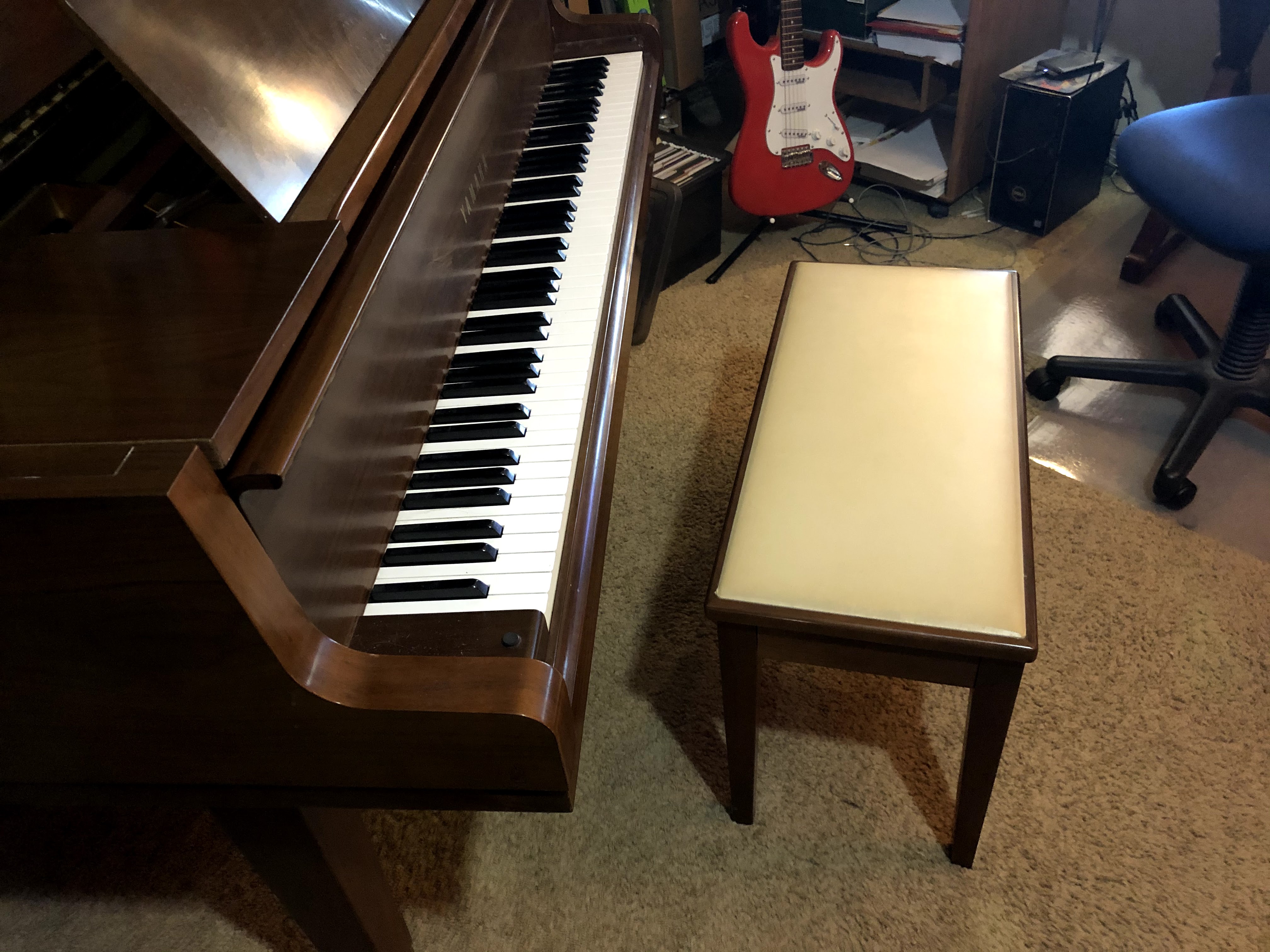
In 2018 a dream I had for decades came true when a beautiful, mint condition Yamaha G1 baby grand was offered to me for a low price. I jumped at this and enjoyed it for a couple years, but the reality was that my living situation was such that even a baby grand was impractical to play at any hour of the day or night. To my sadness and regret, I realized I would have to sell the piano and buy a digital one.
This piano only had one owner, who had bought it in 1969(!!). Once it was delivered and set up in her house, it was never moved for 50 years. I sold it to a music lover in Orange County (Southern California) and I sincerely hope they love it and play it every day.
The quest for a replacement
I knew that I was going to have to settle for a digital piano. So I at least had the fun of researching them. I was delighted to find that there were many more options than there were years ago when I looked into this. I remember buying a 60-pound Fatar 88-key MIDI controller years ago and trying countless sound modules. I will say that I settled on the E-mu Proformance+ half-rack piano module, and that was my primary piano sound for many years. Later on, I used the grand piano sounds from the Roland “Session” expansion card for the JV-*80 synth series. But I knew these were only placeholders, as many of my software and hardware synths were…
Minor corrections and edits 2023-08-18
By A. Person|Tagged Computers for music|Comments Off on My band all got sick and died at once (or; woes of moving to Windows 10)
OK, I need the collective knowledge of the internet to help me out with this one!
Mystery Sample from “Haborthelem”(4:16) from “Songs in Work”
(click (>) to play)
Years ago in the Csound Book sample CDs there was a folder called “GomiPeace – KazuhikoGomi – SpeechProcessing” that had this file “pareq2.wav” — which I presume was intended to demonstrated parametric eq and a number of other signal processing techniques. But I found it intriguing and ended up building a piece off it
The basic sample just sounds like a woman saying a word that I would transcribe as “haborthelem”. She seems to enunciate it very clearly but I have no idea what language it is or what it might mean. What we need is a google – type search but of an audio file. Yahoo had something like this but they closed it down in 2008. Google doesn’t have it and Shazam, while a really cool way to find out what song is playing, doesn’t do it either.
Roughly related to this, I had a friend share with me a piece of audio that he got years ago from a friend on an old cassette, and never could figure out what it was. It was an approximately three minute piece of a young boy reciting a metaphysical essay with a very simple piano piece playing behind it. By using some keywords from the recitation, I found out it was a Ray Lynch production — I believe the title is “A great and wonderful mystery”.
When you are confronted with an unknown text or song as in this case, if your searching comes up empty, wait a couple years because every year the web adds terabytes of data. This is particularly true if your interest is in genealogy; I have found links in even casual searches that came up blank just a few years ago.
Follow up 2019-11-05 – well, a year and a half has gone by and I am no closer to solving the problem. I need to find a “speech-to-text” project or a “audio search engine” on the web and submit to file to those…
After clearing up the “studio housekeeping” problems I am back working on songs. I have a few things currently in the works, early versions of which I hope to offer here soon.
I’m interested in extreme and death metal lately, which means guitar playing. I have been wrestling with my cheap electric solid body for a long time: with mediumweight strings and all 5 springs installed on the tremolo I still have too high strings. So finally a huge light bulb went off; I detuned all strings by a whole step and I get perfect action and a nice fatter sound.
I have been agonizing over guitar amp sims too, trying every demo in sight. The problem is that I’ll dial in a sound that seems perfect, then come back in the morning at hate it. Currently my strategy is to layer the fabulous free Dirthead 0.80 and Voxengo BoogeX as a group in live, tweak each plugin for a different part of the sound and then mix them. I also find myself returning to the built-in guitar processors in the humble but might Zoom R8 recorder. So maybe I won’t plunk down money for a software guitar sim for the moment….
Meanwhile let me recommend the interview with Oneohtrix Point Never in the latest (December 2015) issue of Electronic Musician. His process is intriguing and I note with satisfaction that he is also an Ableton Live exclusivist.




 crow caw music works